
Most clients came to us asking about attendance — and left talking about something else entirely
There’s a version of this conversation we’ve had dozens of times. A company reaches out, explains they want to get rid of their manual attendance process, and asks whether face recognition can help. The answer is yes, it can. But what happens next is almost always more interesting than the original question.
Somewhere around the third or fourth meeting, after we’ve spent time understanding how the office actually runs day to day, the conversation starts to drift. The attendance question doesn’t go away — but it gets joined by other things. Can we tell how full the office is on a given afternoon? Do we have any idea whether the meeting rooms we invested in are actually being used? If someone from the security team needs to locate a person quickly, how long does that typically take right now?
These questions aren’t random. They point to something most management teams already feel but haven’t quite articulated: the real problem isn’t that attendance tracking is too manual. The real problem is that they have almost no reliable visibility into what’s happening inside their own workplace on a day-to-day basis. Attendance is one symptom of a broader information gap.
What follows is an honest account of what we’ve observed across several real office deployments — what worked, what surprised people, and where the friction showed up.
The cameras were already there — the missing piece was making sense of what they recorded
One of the first things we notice when walking through a new client’s facility is how much camera infrastructure is already in place. Entrances, corridors, elevator lobbies, reception areas, common spaces — most offices installed CCTV years ago for basic security purposes and haven’t thought much about it since.
What that infrastructure was actually doing, in most cases, was recording footage that nobody watched unless something went wrong. Thousands of hours a year, sitting in storage, queried only when an incident needed investigating. The cameras were there. The data was there. But without the right layer sitting on top, none of it was producing any useful operational information.
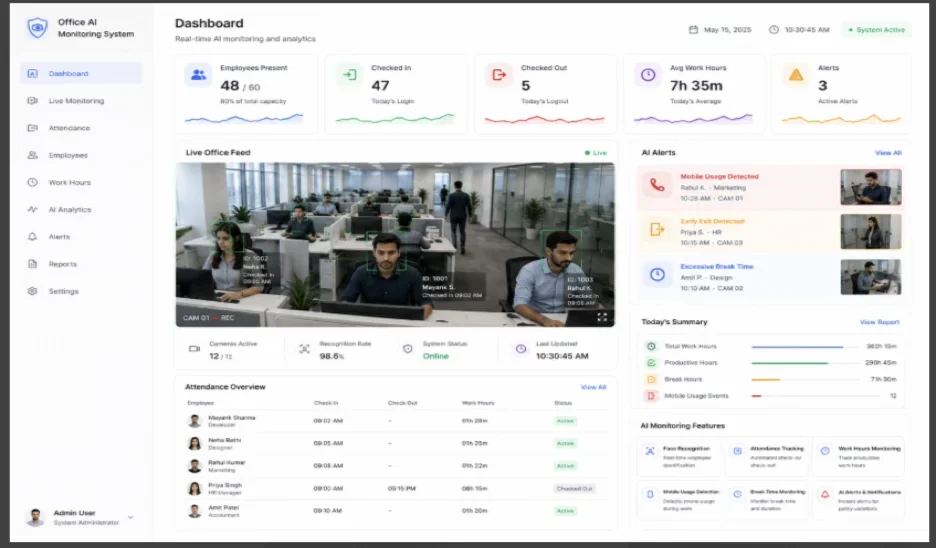
That’s the gap that face recognition and video analytics fill in practice. The cameras don’t change. The cabling doesn’t change. What changes is that the video feed stops being a passive archive and starts generating live information about who’s present, where they are, and how the space is being used. For most clients, this is the part that catches them off guard — they expected to be buying a new attendance system, and they ended up with something that touched a much wider set of operational questions.
Attendance got fixed, but that turned out to be the least interesting part
Let’s deal with attendance first, since it’s usually why the conversation starts. The problems with card-based or manual systems are consistent across almost every environment we work in: cards get forgotten, colleagues lend their cards to each other without thinking much about it, fingerprint readers get dodged for various reasons, and the records that come out of all this require someone in HR to spend time every week cleaning up discrepancies.
Face recognition removes most of that friction in a fairly straightforward way. Employees walk through entry points, the system logs their presence, and the record is tied to an actual verified appearance rather than a card that could be in anyone’s pocket. The disputes don’t vanish entirely — people still have legitimate questions about specific entries — but the volume drops noticeably. One client’s HR team told us they went from correcting around fifteen to twenty attendance records per week down to two or three. Not zero, but meaningfully better.
What nobody anticipated was how much less time got spent on the downstream effects. When payroll queries are mostly gone, when managers stop fielding weekly questions about missing entries, when monthly reporting doesn’t require a manual audit before it goes to finance — all of that time adds up. It’s not glamorous, but it’s real.
The meeting room discovery that made everyone a bit uncomfortable
One deployment sticks in my memory because of a specific moment about six weeks in. The client was a professional services firm, medium-sized, operating across three floors of a fairly well-appointed office. They had invested heavily in meeting room infrastructure — large boardrooms, smaller breakout spaces, a dedicated training suite. The assumption, held firmly by senior management, was that demand for these rooms was the primary space utilization problem.
The occupancy data told a different story. The large meeting rooms were sitting empty for significant portions of the day — sometimes more than half the working hours across a typical week. Meanwhile, the informal collaboration areas and smaller two-person pods were running consistently high utilization, sometimes creating informal queues because there simply weren’t enough of them.
Nobody in the organization had deliberately ignored this. They just had no way of seeing it. The booking system showed rooms as reserved, but reservations and actual occupation aren’t the same thing. When a meeting gets cancelled twenty minutes before it starts and nobody bothers to release the room in the system, that room shows as unavailable. When people congregate informally in a corner that has no booking system attached to it, that activity is completely invisible to management.
Real-time occupancy analytics changed what the organization could actually know about itself. The senior team found the results genuinely useful, but I’d be dishonest if I didn’t mention there was also a period of discomfort — nobody enjoys discovering that the assumptions they’ve confidently held for years were off by that much.
Visitor management — the process that everyone tolerates and nobody loves
Ask any reception team about their visitor log process and you’ll usually get a patient description of something that works but takes more time than it should. Paper registers, temporary badge printing, manually phoning ahead to the host, re-explaining Wi-Fi passwords — it’s functional, but it’s also a collection of small tasks that accumulate over the course of a day.
Face recognition visitor management doesn’t reinvent this process so much as trim the manual parts out of it. Visitors who are pre-registered can be recognized on arrival without needing to state their name or produce identification. Arrival times are logged automatically. The host gets notified immediately rather than relying on reception staff to make a call. Historical records become searchable by date, name, or host, rather than requiring someone to leaf through a physical folder.
The security dimension is worth mentioning separately. In most offices, the question of who is currently inside the building at any given moment is surprisingly difficult to answer with confidence. A visitor badge issued at reception says someone was given access, not that they’re still present. Face recognition visit tracking can give security teams a clearer, more current picture — which matters less in routine circumstances and matters quite a lot when something unexpected happens.
Security teams used it differently than we expected
When we start a deployment conversation with a security-focused stakeholder, the initial use cases they describe tend to be fairly dramatic — catching intruders, matching faces against watchlists, that kind of thing. These are legitimate capabilities, and we’ve seen them used in environments where the threat profile warrants them. But in typical office deployments, the security value tends to show up in quieter, more operational ways.
The most common thing we heard from security teams after go-live was that their job felt less reactive. Instead of scanning multiple camera feeds hoping to notice something, they were receiving specific alerts when something actually needed their attention — an access attempt outside approved hours, movement in an area that shouldn’t have occupants at that time, an individual whose credential didn’t match the expected profile for that entry point. The alerts directed their attention rather than leaving them to find the needle in a constant stream of unremarkable footage.
Several teams also mentioned the value for post-incident review. When something does happen — a confrontation in a corridor, a piece of equipment that’s gone missing, an access anomaly that needs explanation — being able to search footage by identity rather than scrubbing through hours of video manually represents a significant time saving. It’s not the headline capability, but it’s the one that gets mentioned most often in the months after deployment.
Personnel availability — a useful tool that requires careful handling
This is the use case where we’ve seen the most internal debate during deployments, and I think that’s appropriate. The capability is straightforward: the system can generate an alert if a person hasn’t appeared in a monitored area for an unexpectedly long period during working hours. For certain roles — safety-critical positions, lone workers, roles that require physical presence in specific zones — this has genuine operational value.
The risk is that it slides from operational awareness into something that feels, or is, surveillance of the kind that erodes trust and morale. We’ve seen both happen. The deployments where it works well are the ones where the purpose is clearly communicated upfront, where it’s tied to specific role requirements rather than applied blanket-wide, and where the output is used to respond to unusual situations rather than to monitor day-to-day behaviour.
The deployments where it creates problems are usually the ones where that communication didn’t happen, or where the scope gradually crept beyond what was originally explained to employees. The technology works the same either way. The difference is entirely in how it’s governed and communicated — which is a management decision, not a technical one.
What actually made deployments work — and what made them struggle
After sitting through enough of these projects, the patterns become fairly predictable.
Lighting and camera placement matter far more than most people expect going in. We’ve repositioned a camera by two feet and watched recognition accuracy improve dramatically. We’ve also seen environments where the existing camera infrastructure was positioned purely for wide-area coverage, at angles that weren’t optimal for face recognition, and getting acceptable performance required either moving hardware or accepting lower accuracy in certain zones. These are solvable problems, but they need to be scoped properly before the project starts, not discovered after go-live.
Employee communication is probably the single biggest variable in whether a deployment lands well or generates resistance. The organizations that handled this well were direct and specific — they told employees what data was being captured, where it was stored, how long it was retained, who could access it, and what it would and wouldn’t be used for. They did this before the system went live, not after. The organizations that treated this as an afterthought, or assumed employees would just accept it, tended to spend significantly more time managing concerns and pushback well into the post-launch period.
The third thing is integration. Face recognition operating as a standalone island produces a narrower set of benefits than face recognition feeding into access control, HR systems, visitor management software, and security operations simultaneously. The more of those connections that are in place from the start, the faster the value becomes visible and the more confident stakeholders become in the investment.
Where this is all heading — and what it means for organisations thinking about it now
The trajectory for face recognition in office environments is toward integration rather than expansion of the core capability. The face recognition piece is largely solved — it works reliably in well-designed deployments. The interesting developments are happening at the level of what gets built around it.
Hybrid work has pushed occupancy intelligence up the priority list for most organizations. Knowing not just that employees badged in, but how many people are actually present, in which areas, at which times, and how that compares to the available space — this kind of data is genuinely useful for making sensible decisions about office layouts, lease commitments, and resource allocation. Face recognition is one input into that picture, alongside desk booking systems, meeting room sensors, and network activity data.
For organizations considering deployment now, the practical advice is consistent with what we’ve learned across multiple projects: start with the specific operational problem you’re actually trying to solve, invest time in the site assessment and camera positioning before anything else, and treat the employee communication as part of the core project rather than something to handle after the system is live. The organizations that do those three things well tend to end up with deployments that deliver what they expected. The ones that skip steps tend to find out why those steps mattered.
The underlying technology isn’t the hard part anymore. The organizational decisions around it still are.

 USA
USA