
Performance testing plays an essential role in ensuring that applications can handle real-world user loads without breaking down. One of the most effective approach to test an application behavior is through an end-to-end (E2E) flow, which simulates a complete real user flow from start to finish. Apache JMeter is a popular open-source tool which helps to create and execute these E2E performance tests helps to build reliable, realistic tests that reveal how your system performs under stress.
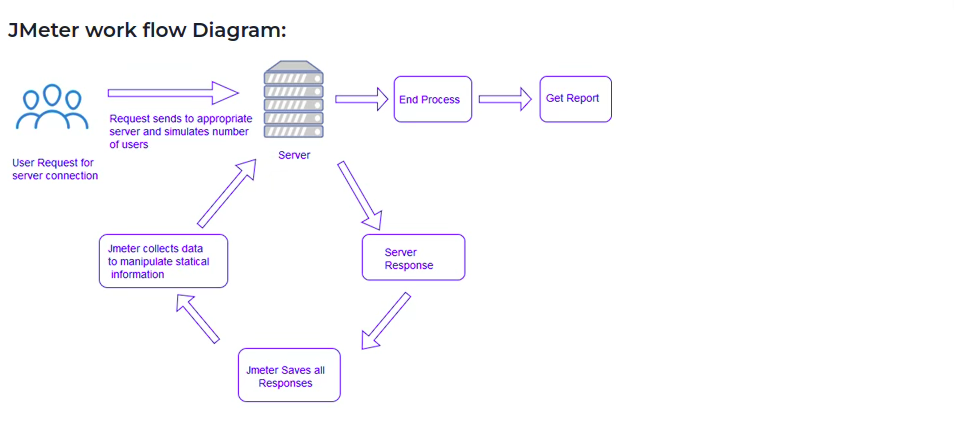
Understanding E2E Flow in Performance Testing
An E2E flow represents a process a user follows to complete a task in an application. Let’s take an example on e-commerce site, this include browse products, add to cart, log in, check out, and receiving confirmation. Testing this flow ensures that all components work together smoothly under load.
E2E Performance testing helps to identify the bottlenecks which may not be appear when the system is isolated while testing the application. It also verifies the services which integrates such as databases front end components which hold up during peak usages.
Why Use JMeter for E2E Performance Testing
JMeter is widely used open source and supports multiple protocols it is extensible and user-friendly interface. It allows testers to:
- Simulate multiple user scenarios and performing complex workflows
- Record and replay real user actions to create test scripts
- Parameterize inputs to mimic real-world variability
- Analyze detailed reports and metrics after test execution
Its flexibility makes JMeter ideal for building E2E tests that cover diverse scenarios.
Planning Your E2E Test Flow
Creating a reliable test scenario begins with careful planning. Without proper preparation, performance tests may generate misleading results.
- Define the scope: Identify the key user business transactions to include and avoid the unnecessary steps that will not impact performance.
- Map dependencies: Understand the backend services such as APIs and databases which is necessary.
- Set performance goals: Estimate the target response times, throughput and acceptable error rates.
- Gather test data: Prepare realistic input data such as user credentials, product IDs and payment details.
A clear plan helps create focused and effective tests.
Creating an E2E Test Plan in JMeter
Step 1: Record the User Flow
Use JMeter’s HTTP/HTTPS Test Script Recorder to capture the workflow:
- Need to configure JMeter as a proxy server.
- Perform the E2E flow manually in a browser or application.
- JMeter records each HTTP request, building a test script.
This method captures all requests, including AJAX calls and redirects.
Step 2: Organize Requests with Thread Groups
Thread Groups simulate multiple users running the test concurrently:
- Number of Users (threads)
- Ramp-up period (all users start time)
- Loop count (number of iterations)
Create separate Thread Groups if you want to test different user types or scenarios.
Step 3: Parameterize Inputs
Replace hardcoded values with variables to simulate real users:
- Use CSV Data Set Config to read input data from files.
- Apply User Defined Variables for reusable parameters.
- Correlate dynamic values like session IDs using Regular Expression Extractors.
Parameterization prevents caching effects and makes tests more realistic.
Step 4: Add Timers and Think Time
To simulate with the real user scenarios, add timers to delays between requests:
- Uniform Random Timer for random delays
- Constant Timer for fixed delays
- Gaussian Random Timer for varied delays
This helps to mimic user behavior and avoids unrealistic load spikes.
Step 5: Include Assertions and Listeners
Add assertions to verify that responses meet expectations, such as:
- Response contains specific text
- Size contains specific size of bytes
- HTTP status code is 200
Listeners collect test results and displays based on the listener used such as Summary Report, Aggregate Report, and View Results Tree to analyze performance.
Handling Complex E2E Scenarios
Some applications require advanced handling:
- Authentication: Use HTTP Authorization Manager or script login flows.
- Session management: Extract and reuse session cookies or tokens.
- File uploads/downloads: Configure HTTP Request samplers accordingly.
- Multiple protocols: Combine HTTP with JDBC, FTP, or JMS samplers if needed.
JMeter’s flexibility supports these complex cases.
Running and Analyzing Your E2E Tests
Run tests in non-GUI mode for better performance during large-scale tests:
bash
jmeter -n -t testplan.jmx -l results.jtl
After execution, analyze results to identify:
- Slowest transactions
- Error rates and failure points
- Throughput and response time trends
Use graphs and dashboards to visualize data and communicate findings.
Best Practices for E2E Performance Testing with JMeter
- Keep test scripts modular and reusable.
- Use meaningful names for samplers and variables.
- Clean up test data after runs to maintain environment stability.
- Monitor server resources alongside JMeter metrics.
- Start with small loads and gradually increase to avoid overwhelming systems.
- Document test plans and results for future reference.
Summary
Apache JMeter is a tool which makes it possible to design realistic workloads to execute large-scale user simulations and analyze metrics to perform results to the load tests. Properly planned and implemented, E2E testing becomes a powerful technique for improving application reliability and ensuring systems remain stable under heavy demand

 USA
USA