
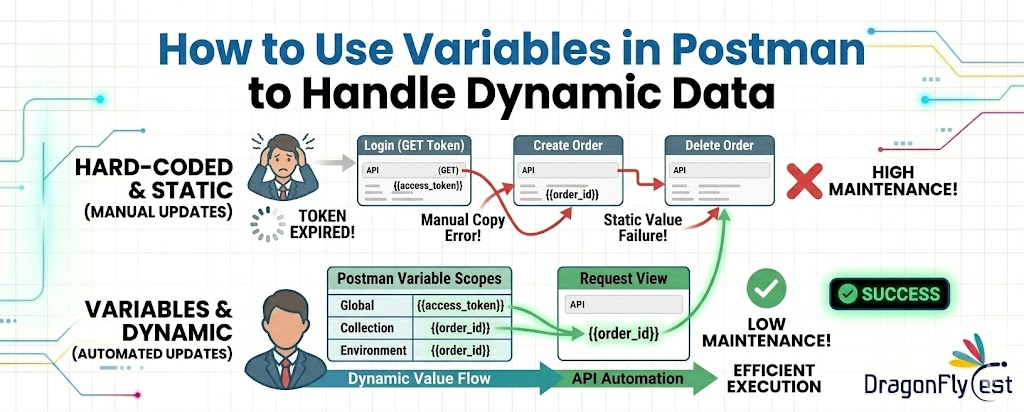
I didn’t give variables much thought when I initially started using Postman.
I would submit a request, review the reply, copy an ID, insert it into the subsequent request, and proceed. It seemed normal at the moment. That strategy didn’t appear flawed.
However, that practice quickly got unpleasant once I started working on relatively larger APIs.
Every minor modification required me to go back, copy values again, confirm that I had pasted the correct information, and occasionally troubleshoot problems that were, in all honesty, simply the result of using the incorrect ID someplace.
At that point, I realised I had to start using variables correctly and quit doing things by hand.
Why Dynamic Data Handling Is Important
Let’s understand with a real scenario about How to Use Variables in Postman
Without Variables
- Login → get token
- Copy token manually
- Paste into next API
- Repeat every time
The First Time Variables Actually Made Sense
I remember testing a basic flow where I had to:
- Create a user
- Fetch that user
- Update the same user
Simple flow, nothing complex.
But the problem was this: every time I created a user, the ID kept changing. So I had to copy it again and again.
At some point, it just clicked — why am I doing this manually?
Instead, I added a small script after the create request:
let res = pm.response.json();
pm.environment.set(“user_id”, res.id);
That was it.
Now, instead of copying anything, I just used:
{{user_id}}
in the next request.
That small change saved time immediately. More importantly, it removed a lot of silly mistakes.
Understanding Variables
If you read documentation, you’ll see terms like global, environment, collection variables. It can feel a bit much at first.
But honestly, you don’t need to complicate it.
Here’s how I think about it:
- If something changes between environments → use environment variables
- If something belongs to one collection → use collection variables
- If something is temporary → just keep it local
That’s it. No need to memorize definitions.
Where We Use Variables the Most
Most of the time, I end up using variables in three places.
1. URLs
Instead of writing the full URL again and again:
{{base_url}}/users/{{user_id}}
This becomes especially useful when switching between dev and staging. I don’t touch the requests at all — just change the environment.
2. Headers
Tokens are the most obvious example.
Authorization: Bearer {{token}}
Earlier, I used to paste tokens manually. Now I just update it once and everything works.
3. Request Body
This one is underrated.
Instead of hardcoding values:
{
“name”: “Rahul”,
“email”: “[email protected]“
}
I prefer something like:
{
“name”: “{{username}}”,
“email”: “{{email}}”
}
It makes the request reusable.
Dynamic Data
There was a time when my tests kept failing because of duplicate data.
For example, creating users with the same email again and again.
Then I found Postman’s dynamic variables.
Things like:
{{$randomFirstName}}
{{$randomEmail}}
Now I don’t even think about test data most of the time.
I just write:
{
“name”: “{{$randomFirstName}}”,
“email”: “{{$randomEmail}}”
}
Every run gets fresh data automatically.
One Mistake I Kept Making
For a while, I was storing everything as a global variable.
It felt convenient… until it wasn’t.
At some point, different collections started interfering with each other. I would change a value in one place, and something unrelated would break.
That’s when I started being more careful with scope.
Now I mostly stick to environment variables unless there’s a reason not to.
Another Small Thing That Matters More Than You Think
Naming.
I used to name variables like this:
id
data
value
Later, when things got bigger, I had no idea what those meant.
Now I try to be specific:
user_id
order_id
auth_token
It doesn’t feel important in the beginning, but it saves time later.
When Things Go Wrong (Because They Will)
Even if you understand variables well, you’ll still run into issues.
A few that I’ve personally faced:
- Variable not updating because script didn’t run
- Wrong scope being used
- Accidentally overwriting a value
- API response not returning expected data
One habit that helped me avoid some of this is adding a simple check:
let res = pm.response.json();
if (res && res.id) {
pm.environment.set(“user_id”, res.id);
}
It’s a small thing, but it prevents storing garbage values.
Building a Flow Instead of Isolated Requests
This is where variables really start to feel powerful.
Instead of testing requests one by one, you start linking them.
For example:
- Create something
- Store its ID
- Use it in the next request
- Continue the chain
At that point, your collection starts behaving like a real workflow instead of random requests.
And that’s usually when automation becomes easier.
A Real Scenario I Worked On
I was testing an order system once.
The flow looked like this:
- Create customer
- Create order using that customer
- Fetch order details
- Cancel the order
Without variables, it would have been painful.
With variables, it just worked.
Each request passed data to the next one. No manual steps in between.
That’s when I realized variables are not just a feature — they’re the backbone of how you scale testing.
Things I Do Differently Now
After using Postman for a while, a few habits became natural:
- I avoid hardcoding almost everything
- I try to keep variables organized
- I don’t use globals unless absolutely needed
- I reset variables when tests behave oddly
- I keep scripts simple instead of overengineering
Nothing fancy. Just practical adjustments.
If You’re Just Starting Out
Don’t try to learn everything at once.
Just do this:
- Take one request
- Capture one value from the response
- Use it in the next request
That’s enough to get started.
Once you get comfortable, you’ll naturally start using variables everywhere.
Final Thought
Looking back, variables were one of those things I ignored at the beginning because they didn’t seem important.
But once I started using them properly, they changed how I worked with APIs.
Less copying. Fewer mistakes. Cleaner flows.
And honestly, a lot less frustration.
If you’re still doing things manually in Postman, this is probably the easiest upgrade you can make.
Claim Your Free POC today at www.dragonflytest.com

 USA
USA