
Why waits are used in automation:
In automation, Selenium executes commands very fast, much faster than how a real user interacts with a website.
Wait methods are used to synchronize the execution of test scripts with the state of the web application.
Wait methods helps the scripts wait for certain conditions to be met before proceeding, which is crucial for webpages where web elements may take time to load.
They also helps to observe and troubleshoot issues that may occur due to variation in time lag.
But web pages usually take time to load things like:
- buttons
- images
- dropdown lists
- search results
- pop-ups
Many modern websites load data using JavaScript or API calls, so elements appear a few seconds after the page loads. To handle this situation, Selenium provides wait mechanisms that allow automation scripts to pause execution until elements are ready for interaction.
Role of Waits in Selenium:
When automation scripts run, they execute much faster than a real user.
But websites often take time to load elements because of:
- API calls
- JavaScript rendering
- Images
- Slow Network
- Waits play a crucial role in enhancing the reliability and robustness of automated tests by ensuring a seamless interaction between scripts and web applications.
- Without waits, your automation script might try to click a button that hasn’t loaded yet, leading to errors or failures.
- In simple terms, waits tell the automation script to pause until a specific element or condition becomes available.
For example:
If Selenium tries to click a button before the page finishes loading, it may result in an error. Using waits allows the script to pause until the button becomes clickable.
What Happens Without Waits in Automation:
- If the automation script tries to interact with an element before it becomes available or ready, the test will fail. This is why waits are necessary in automation.
Without proper waits, automation scripts may encounter issues such as:
- NoSuchElementException
- ElementNotInteractableException
- ElementClickInterceptedException
- StaleElementReferenceException
How we calculate the time for waits:
In real automation projects, wait time is decided based on application behavior, network speed, and element load time.
Automation engineers typically observe:
- Page load time
- API response time
- Element rendering time
- Network conditions
Types of waits:
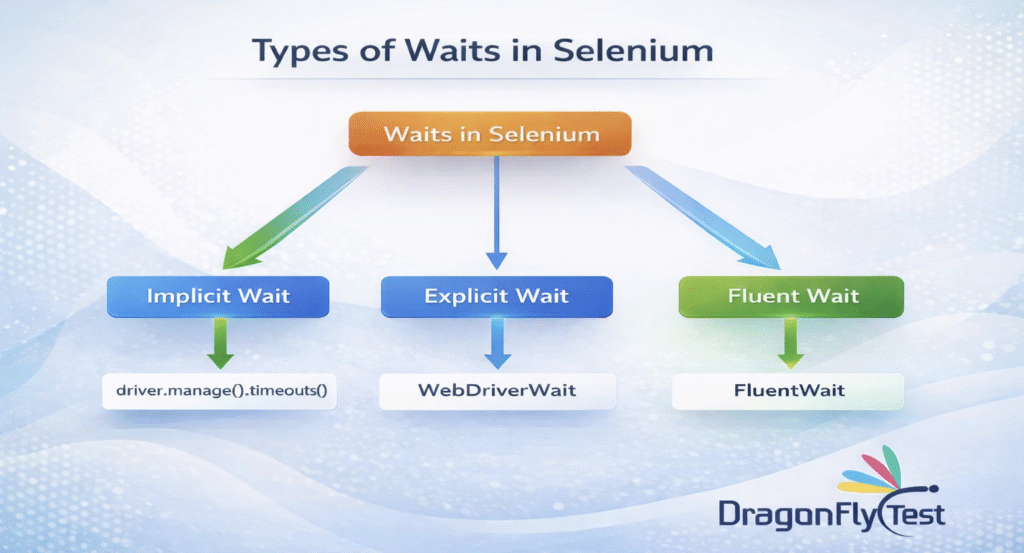
Implicit Wait:
Implicit wait instructs Selenium to wait for a predetermined period of time while looking for components on the page. Selenium continues to search until the timeout is reached if the element is not discovered right away. Every element search in the script is subject to this global wait.
During Implicit wait, the WebDriver will poll the DOM for certain specified time units while trying to find any element. The polling time is the interval time in which selenium start searching again after the last failed try.
The polling time may be 500ms or 1sec according to the webDriver we are using. Polling time is inbuilt in implicit wait and for fluent wait we need to specify the polling time interval.
Syntax:
driver.manage().timeouts().implicitlyWait(Duration.ofSeconds(10)) ;// Waits upto 10 seconds.
Explicit Wait:
The Explicit Wait allows the script to pause execution until certain explicitly defined conditions are met. It’s designed to wait for specific elements or conditions (such as element visibility, clickability, etc.) for a specified maximum duration before continuing with the script execution.
Since explicit waits only works on conditions they help in syncronization the browser,DOM and test execution script.
Syntax:
WebDriverWait wait = new WebDriverWait(driver, Duration.ofSeconds(10));
Fluent Wait:
Fluent wait defines the maximum amount of time to wait for specific condition, as well as the frequency with which to check the condition.
Fluent wait is a more flexible form of explicit wait that allows you to define the polling interval and ignore specific exceptions while waiting. Instead of checking continuously, Selenium checks for the element at regular intervals. This is useful for applications where elements appear at unpredictable times.
The frequency numbers tells the webDriver to keep checking for the element at regular intervals and wait till the maximum duration of seconds.{Duration.ofseconds}
Syntax:
Wait<WebDriver> wait = new FluentWait<>(driver).withTimeout(Duration.ofSeconds(20))
.pollingEvery(Duration.ofSeconds(2)).ignoring(NoSuchElementException.class);
Here in the above syntax the maximum wait is 20 seconds and polling time is 2 seconds.
How Does it Work?
The Fluent Wait operates through the FluentWait class, which enables users to create customized waiting strategies by specifying the maximum time to wait, the frequency of checks (polling interval), and exceptions to overlook during the wait. It continuously polls for the presence of a particular condition until the condition is met or the timeout period elapses.
Comparison of Selenium Waits:
| Wait Type | Scope | Use Case |
| Implicit Wait | Global | Applied to all elements |
| Explicit Wait | Specific Element | Wait For condition |
| Fluent Wait | Advanced Control | Custom polling and exceptions |
Conclusion:
Waits are essential in automation because they ensure that Selenium interacts with web elements only when they are available and ready.
Using proper waits helps maintain stable, reliable, and efficient automation tests.

 USA
USA