
INTRODUCATION:
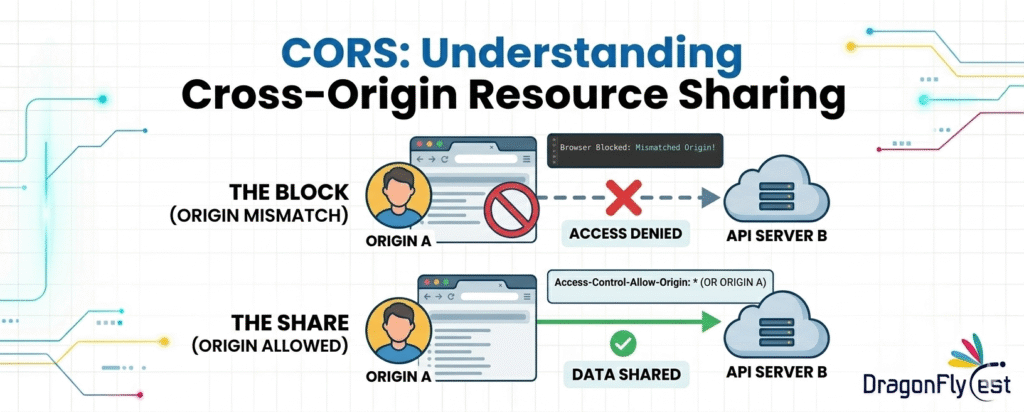
A browser-enforced security feature called CORS (Cross-Origin Resource Sharing) controls how web apps operating in one origin can access and use resources from another origin. The combination of protocol (HTTP/HTTPS), domain, and port defines an origin; any change in these components causes a cross-origin request.
Applications are frequently divided among several services in contemporary web development, such as a frontend hosted on one domain and a backend API on another. The Same-Origin Policy (SOP), a crucial security regulation intended to stop rogue websites from getting private information from other websites without authorization, is used by web browsers by default.
CORS extends this security concept by providing a controlled and accepted way to go around these restrictions when it’s safe to do so. Servers can explicitly specify which external origins are permitted to access their resources by appending specific HTTP headers to their responses. These headers tell the browser whether to approve or reject the request.
Hi Bounty Hunters !
Origin: What Is It?
Three elements define an origin:
Domain (example.com) Protocol (HTTP/HTTPS) Port (80, 443, etc.)
It has a distinct origin even if there is only a slight variation:
https://example.com ✅ http://example.com is the same origin URL. ❌ (separate protocols)
https://api.example.com ❌ (an alternative subdomain)
https://example.com:8080 ❌ (different ports)
Same-Origin Policy (SOP)
You must be familiar with the Same-Origin Policy (SOP) before you can comprehend CORS.
SOP is a security feature of browsers that:
stops websites from sending requests to other origins.
Why Does SOP Exist?
To defend users against assaults such as:
Theft of data and hijacking of sessions
Unauthorized access to APIs
CORS: What is it?
The CORS protocol enables servers to:
In a regulated manner, loosen the Same-Origin Policy
It uses HTTP headers to provide secure communication between several origins.
How CORS Works:
Case 1:
The browser sends the request
An Origin header is appended by the browser to a cross-origin request:
Source: https://client.com
Case 2:
The CORS headers Access-Control-Allow-Origin: https://client.com are returned by the server.
Case 3.
The browser checks to see if the request is permitted. The request is blocked if it isn’t.
Important: The browser, not the server, enforces CORS.
Exploitation CORS “Origin Reflection”:
CORS “Origin Reflection” exploitation: “When the server receives the Origin header from the request without properly validating it and then reflects it back in the response, this is known as “CORS origin reflection.”
In a secure implementation, the server should only allow specific, dependable origins. However, in this vulnerable scenario, the server dynamically accepts any origin that the client provides and trusts all domains.
The server says, “I will accept it from any origin,” to summarize.
A Crucial Definition
CORS reflection origin exploitation occurs when a server dynamically trusts and returns any origin that the user designates. Attackers can now access private information by circumventing CORS restrictions.
If the response shows attacker.com with access control allow origin and access control allow credentials
We have win !
{
“url”: “https://www.Synack.com/sensitive-details/’,
“Credentials” : “true”,
“type”: “reflection type”,
“origin”: https://evil.com
“Status_code” : 200
}
Exploitation of CORS Prefix Match
A security flaw known as CORS prefix match exploitation arises when a web server validates the Origin header using partial string matching (such prefix-based checks) instead of verifying the exact, trusted domain. Occasionally, the server assesses whether the incoming origin starts with a certain trustworthy value (like https://trusted.com) rather than just matching it to a list of allowed origins.
Attackers can easily get around CORS restrictions by creating rogue domains that look authentic but are actually under their control because of this faulty validation. Because it starts with https://trusted.com, a domain like https://trusted.com.attacker.com will pass a prefix-based check even though it is not a trusted domain because the response header includes the attacker’s origin as valid.
This misconfiguration becomes extremely dangerous when used with Access-Control-Allow-Credentials: true because it allows the attacker to send authenticated requests on behalf of a victim and get sensitive data, such as user information, session details, or API replies. Ultimately, if sensitive endpoints are compromised, abusing CORS prefix matches may result in negative consequences like data leaks, unauthorized access, and even a full account breach.
{
“url”: “http://www.hakonindia.org/wp_json”,
“Credentials”: “true”,
“type”: “prefix_match”,
“origin”: ”http://www.hakonindia.org,evil.com”,
“status_code”: 200
}
Exploitation of CORS Suffix Match:
A CORS suffix match vulnerability arises when a server verifies the Origin header using ends With () or lazy suffix-based checks instead of strict, exact matching. In conclusion, attackers can easily go around the server’s trust if the domain finishes with a particular string.
Consequently, the server includes these attacker-controlled sources in the Access-Control-Allow-Origin response header, mistakenly treating them as legitimate.
This misconfiguration presents a serious security concern since attackers can easily create rogue domains that meet the suffix requirements while staying under their control. For example, domains like https://eviltrusted.com, https://attackertrusted.com, or https://malicious-trusted.com all end in trusted.com and would pass such lax validation checks while not being approved or trusted.
This allows the attacker’s website to use cross-origin requests to obtain confidential data from the vulnerable application.
Access-Control-Allow-Credentials: true, which permits authenticated requests using the victim’s session cookies, greatly raises the risk. Cross-origin searches, tricking a logged-in user into visiting a malicious website, and stealing private data like account details, account information, or API responses are all possible under some conditions.
{
“url”:”https://ukrainianpople.us/wp_json/’,
“Credentials”: “true”,
“type”: “suffix_match”
“origin” : https://evilukrainianpeople.us”,
“status_code”:200
}
Impacts of CORS :
Sensitive data exposure allows hackers to access user information (account details, profiles, etc.).Meeting Hijacking: Because cookies are sent automatically, user sessions might be abused.
Account Takeover: Complete access to user accounts in the case that confidential APIs are made public
Data exfiltration: Information could be taken and transferred to servers under the control of an attacker.
Token or API key leakage: When JWT tokens or API keys are made publicly available
Internal API Exposure: External access to secret or internal endpoints
Attackers might behave illegally on the user’s behalf.
Information Disclosure: Provides system and backend data
Only trusted origins are permitted (exact match, no prefix/suffix checks).
For sensitive APIs, stay away from * (wildcard).
Don’t dynamically reflect Origin
Make use of the permitted domain whitelist
Only enable credentials when necessary (never with *)
Limit headers and methods to what is absolutely necessary.
Turn off CORS for private and internal APIs.
Conclusion :
CORS is a vital component of current web security. It enables regulated access to several origins while safeguarding users from dangerous attacks. Understanding how CORS operates is critical for developers, testers, and security experts alike.
If properly setup, it allows for smooth integration of services.

 USA
USA