

Picture this: you’ve written what looks like a perfectly fine test. No syntax errors. Dependencies are installed. You hit run. And then — nothing. Or worse, a cryptic error that tells you absolutely nothing useful.
If you’ve been there, you’re not alone. A huge chunk of Appium failures have nothing to do with the test itself. They happen somewhere in the layers that sit between your code and the actual device screen. And if you don’t know those layers exist, you’ll keep looking in the wrong place.
This guide breaks down Appium’s architecture in plain terms — what every component does, how they hand off work to each other, what changed with Appium 2.0, and where to look when something goes sideways.
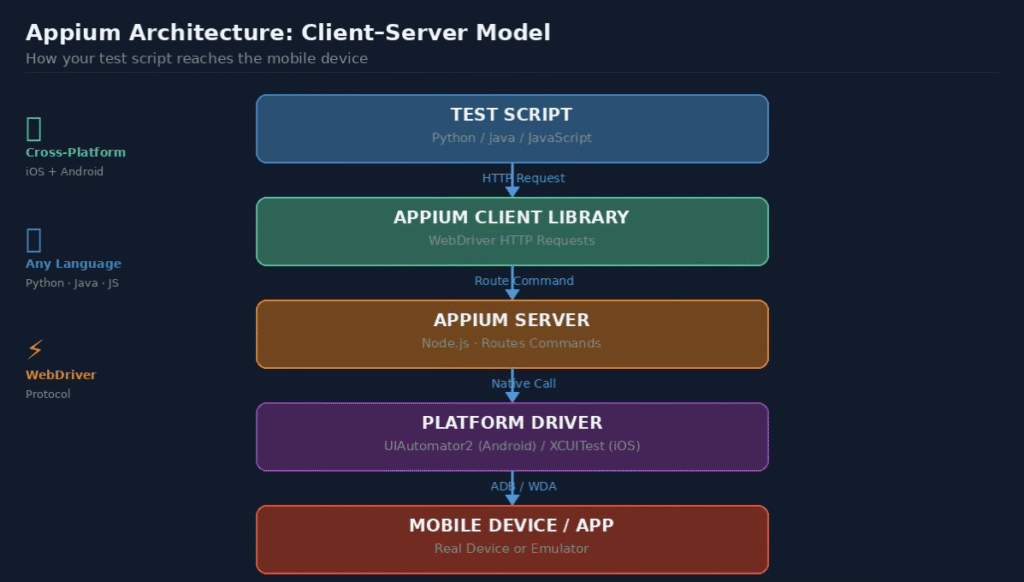
Figure1:Appium’sclient–servermodel— thefullpath from testscriptto mobiledevice
BeforeYouWriteAnotherTest,UnderstandThis
There’s a tempting shortcut when learning Appium: copy a working example, swap in your app details, run it, and call it done. That works — right up until it doesn’t.
When session errors appear, when the driver throws unexpected exceptions, when the app stops responding mid-test — the testers who recover quickly are almost always the ones who took time to understand what’s actually happening under the hood.
Knowing the architecture gives you a map. Instead of randomly tweaking settings hoping something sticks, you can ask: did this fail at the client level? The server? The driver? The device itself? Those are four very different problems with four very different fixes.
Practically speaking, architecture knowledge pays off in four areas:
- Session failures become diagnosable — you can tell whether the issue is in capabilities, the driver installation, or the device connection.
- Driver errors stop being mysterious — you know which driver handles which platform and what it’s responsible for.
- Framework design gets better — you stop building workarounds for problems that the architecture already solves.
- Debugging gets faster — instead of re-running tests hoping the error changes, you trace the problem to its actual source.
TheFoundation:WhyAppiumUsesa Client–Server Design
Every Appium test involves two separate processes talking to each other. On one side sits your test code. On the other sits the Appium server. Between them runs the WebDriver protocol — the same communication standard that powers browser automation through Selenium.
Your test code never touches the device directly. It sends HTTP requests to the server, the server interprets those requests, and then routes the right instructions down to the appropriate driver for the target platform.
This separation might seem like unnecessary complexity, but it’s actually what makes Appium genuinely flexible. Because the client just speaks HTTP, you can write tests in any language that has an HTTP client
— which is basically every modern language. Python, Java, JavaScript, Ruby, C# — they all work. The device side doesn’t care.
Keyinsight:Appiumdoesn’tautomateyourappdirectly. Itautomatesthedevice,andthedevicerunsyour app. That distinction matters when you’re debugging.
ACloser LookatEach Component
Six distinct pieces make up the Appium architecture. Each one has a specific role, and understanding where one ends and another begins is what makes troubleshooting logical rather than random.
TheTestScript
Your code. This is where you define what should happen — open the app, find an element, tap it, check the result. The test script doesn’t execute anything on its own. It calls the client library, which takes it from there.
The language you use here is irrelevant from the device’s perspective. Python’s Appium client and Java’s Appium client generate the same HTTP requests. The test script is just the human-readable layer on top.
TheAppiumClient Library
This is the package you import in your test code — appium-python-client if you’re using Python, java-client if you’re using Java, and so on. Its sole job is translating your high-level commands into WebDriver protocol HTTP requests.
When you write driver.find_element(By.ID, ‘login’), the client library doesn’t find anything itself. It packages that instruction as a POST request and fires it off to the Appium server. The response comes back as JSON, and the client library translates that back into a usable object for your code.
The AppiumServer
The server is the traffic controller. It listens for incoming HTTP requests, maintains session state, and forwards commands to whichever driver is managing the current session. Built on Node.js, it runs locally on your machine or on a remote grid if you’re using a cloud testing service.
One thing worth knowing: the server doesn’t actually know how to interact with Android or iOS. That’s the driver’s job. The server just routes correctly and manages the session lifecycle.
Platform Drivers
Drivers are where platform-specific knowledge lives. The UIAutomator2 driver knows how to talk to Android. The XCUITest driver knows how to talk to iOS. Each driver receives a command from the server, translates it into instructions the device OS understands, and reports back.
In Appium 1.x, drivers were built into the server. In Appium 2.0, they’re separate packages you install on demand. More on that shortly.
TheDeviceorEmulator
This is where automation actually runs — a physical device over USB or a software emulator. From Appium’s perspective, the test code doesn’t care which one you’re using. The capabilities you set tell the driver what to expect, and it adapts accordingly.
Emulators are convenient for CI pipelines and quick feedback loops. Real devices catch issues that emulators miss — particularly around performance, camera access, biometrics, and native notifications.
TheApplicationUnderTest
Worth stating clearly: Appium does not require you to add any testing code to your app. No libraries, no instrumentation, no special build flags. It uses the OS’s own accessibility and automation frameworks to interact with whatever is on screen.
That means you can automate the same binary that goes to production. No test-only builds, no risk of shipping testing code to users.
WhatAppium 2.0ChangedAboutthe Architecture
If you set up Appium before 2023, some of this will look different from what you remember. Appium 2.0 made a structural change that affects how you install and maintain everything.
The old approach bundled all drivers into the server package. Install Appium, get everything. Convenient, but it created a problem: updating one driver meant updating the entire server. And the server grew bloated with drivers for platforms you might never use.
Appium 2.0 separated them. The core server is now a lean routing layer. Drivers are independently versioned packages that you install with the Appium CLI:
You install only what your project needs. Driver updates ship on their own schedule. And new drivers from third parties can be added without waiting for a core server release.

Figure2:Appium2.0modulararchitecture —eachdriverandplugininstalls independently
Appium 2.0 also introduced plugins — optional modules that sit between the server and the driver. Plugins can intercept commands, add new endpoints, or extend the server’s capabilities entirely. Common uses include screenshot comparison, custom gesture support, and test result integrations.
For teams migrating from 1.x, the main adjustment is the installation process. The test code itself largely stays the same — the HTTP requests your client library generates haven’t changed.
Tracinga SingleCommandThroughEveryLayer
Abstract explanations only go so far. Let’s follow one specific command — clicking a button — and see exactly where it goes.
driver.find_element(By.ID, “submit_button”).click()
Step one: the Appium client library in your Python (or Java, or JavaScript) environment catches that call. It knows from the session that you’re targeting an Android device with a UIAutomator2 session. It packages the findElement and click instructions as two separate HTTP requests and sends them to the server.
Step two: the Appium server receives each request, looks up the session ID to find which driver is managing it, and forwards the request to the UIAutomator2 driver.
Step three: UIAutomator2 translates the request into a command the Android system understands. It uses ADB to communicate with the device, which relays the instruction to the UIAutomator2 framework running inside the Android OS.
Step four: the Android device finds the element with the given resource ID and performs a tap action. It returns a result to UIAutomator2, which packages it as a response and sends it back up through the server and client library to your test script.
What looks like one line of code actually travels through four distinct software layers before anything happens on screen. That’s why Appium errors sometimes feel disconnected from what you wrote — the failure may have happened two or three layers away from your code.
Android and iOS:WherethePaths Diverge
The top-level architecture is identical for both platforms. The divergence happens at the driver layer, and it’s significant enough to affect how you set things up, debug them, and maintain them over time.

Figure3:AndroidusesUIAutomator2withADB;iOSusesXCUITestwithWebDriverAgent
TheAndroidPath
Android automation in Appium runs through UIAutomator2, which relies on ADB as its communication channel. ADB is a command-line bridge that lets external processes communicate with Android devices — it’s what lets you install APKs, capture logs, and send commands from your laptop to a connected phone.
UIAutomator2 wraps Google’s native UI automation framework and exposes it to Appium. It can interact with nearly any Android app without requiring access to the source code, and it works across a wide range of Android versions.
The Android flow at the driver level looks like this:
- Appium server routes the command to UIAutomator2
- UIAutomator2 sends the instruction over ADB
- The Android device receives it and passes it to the UIAutomator2 service running on-device
- The app responds to the action and returns a result
A common point of failure: ADB authorization. When you connect a new device, it needs to be authorized to accept ADB commands from your machine. If it’s not, Appium’s session creation will fail before a single test line runs.
TheiOS Path
iOS automation goes through XCUITest, Apple’s own UI testing framework built into Xcode. Appium’s XCUITest driver wraps this framework and exposes it through the WebDriver protocol.
The iOS path also involves an intermediate layer called WebDriverAgent (WDA) — a server-side component that gets installed on the iOS device during session setup. WDA translates the driver’s commands into native XCUITest calls.
- Appium server routes the command to the XCUITest driver
- XCUITest driver communicates with WebDriverAgent on the device
- WDA translates the instruction into native XCUITest framework calls
- The iOS device performs the action and returns the result
iOS testing on real devices requires additional setup: a valid Apple developer account, a provisioning profile that includes the device UDID, and Xcode installed on the machine running the tests. Simulators skip most of that overhead, which is why many teams use simulators for development and save real device testing for pre-release validation.
WhenThingsBreak:WheretoLookFirst
Appium errors can feel random until you have a mental map of the architecture. Once you do, most failures point clearly to a specific layer.
SessionWon’tStart
This almost always lives in the capabilities or driver layer. A session can’t start if the desired capabilities reference a device that isn’t connected, an app path that doesn’t exist, or a driver that isn’t installed. On Android, also check that ADB can see the device — run ‘adb devices’ and confirm the device is listed as ‘authorized’, not ‘unauthorized’.
CommandTimeouts
When a command times out, the element usually exists but isn’t ready for interaction yet. Add explicit waits rather than increasing the global timeout. If the timeouts persist, check whether the UIAutomator2 or WDA service crashed on the device — it occasionally needs to be reinstalled.
DriverVersion Conflicts
This is an Appium 2.0-specific issue. Because drivers version independently, a UIAutomator2 driver release might assume a newer Appium server version than you have. Check the driver’s changelog before updating, especially in CI environments where versions need to stay consistent.
WDAInstallationFailures (iOS)
WebDriverAgent failing to install is one of the more frustrating iOS issues. It’s almost always a code signing problem. Verify your provisioning profile includes the test device’s UDID, and that the certificate in the profile hasn’t expired.
WhytheArchitectureIsDesignedThisWay
Every architectural choice in Appium exists for a reason, and knowing the ‘why’ helps you get more out of the tool.
- The client–server split with HTTP means any language with an HTTP client can drive Appium tests. That’s why there are official clients for Python, Java, JavaScript, Ruby, and C#.
- Using the OS’s own automation frameworks (UIAutomator2, XCUITest) means Appium can interact with apps it has never seen before, without source code access, and without special builds.
- The WebDriver protocol gives Appium compatibility with a wide range of tooling built originally for web browser automation.
- Appium 2.0’s modular driver design lets the community build and maintain drivers for platforms beyond Android and iOS — there are Appium drivers for desktop apps, smart TV platforms, and more.
- Plugin support lets organizations extend the server for their specific needs without forking the project or waiting for upstream changes.
CommonQuestionsAboutAppiumArchitecture
DoIneedtoinstall Appiumandthedriversseparatelyinversion 2.0?
Yes. In Appium 2.0, the server and drivers are separate. You install the server via npm and then install each driver using the Appium CLI. For Android you need the UIAutomator2 driver, for iOS you need the XCUITest driver. They update on their own schedules.
Can thesametestcoderunon bothAndroidandiOS?
Largely yes, though you’ll need separate capability configurations for each platform, and some locator strategies work differently across them. A well-structured test framework with a shared keyword or page object layer can make the majority of test logic platform-agnostic.
WhydoesAppiumusetheWebDriverprotocol instead ofsomething custom?
The WebDriver protocol is already standardized, well-documented, and supported by client libraries in nearly every major language. Building on it meant the Appium team could reuse existing client infrastructure and integrate easily with tools already familiar to web automation teams.
WhatisWebDriverAgent anddoI needto configureit manually?
WebDriverAgent is a server component that gets installed on iOS devices when a session starts. In most setups, Appium handles the WDA installation automatically. You only need to think about it manually when there are code signing issues on real devices or when running in environments with strict provisioning constraints.
HowisAppiumdifferentfromrunningXCUITestorUIAutomatordirectly?
Running UIAutomator2 or XCUITest directly ties you to a single language and platform. Appium wraps both through a unified HTTP API, letting you use any language client and switch platforms by changing capabilities. It also adds session management, a plugin ecosystem, and compatibility with third-party testing grids.
Putting ItAll Together
Appium’s architecture looks complex on paper, but it follows a logical pattern once you see it as layers of responsibility. The test script describes intent. The client library translates intent into protocol. The server routes protocol to the right driver. The driver speaks the device’s language. The device acts.
Each layer is independently replaceable and independently debuggable. A session failure isn’t just ‘Appium broke’ — it’s a specific layer that didn’t get what it expected. That precision is what makes experienced Appium users fast at troubleshooting.
Whether you’re setting up a new project or trying to understand why your existing tests keep flaking, time spent understanding the architecture pays back quickly. It’s the kind of foundational knowledge that makes everything else — capabilities, waits, locators, CI configuration — click into place.

 USA
USA