
1. Introduction: Why Android Mobile Testing vs iOS Mobile Testing Matters
If you work in QA, Android mobile testing vs iOS mobile testing is one of the first real challenges you’ll run into. I’ve been doing mobile testing for a while now — longer than I’d like to admit, honestly. And one question keeps coming up, especially from folks who are newer to QA: “Is testing Android really that different from iOS?”
Short answer? Yes. Massively different. And I learned that the hard way.
I remember jumping into my first Android testing project after spending a year mostly on iOS mobile testing work. I figured — hey, it’s mobile testing, same principles, right? Wrong. Within two days I was drowning in device issues I’d never seen before. That experience kind of forced me to really understand what makes each platform tick from a testing perspective.
This isn’t a textbook comparison of Android mobile testing vs iOS mobile testing. It’s just what I’ve seen, what’s tripped me up, and what actually works.
2. Platform Ecosystem: Android (Open) vs iOS (Closed)
Everyone talks about Android being open and iOS being closed, but most people don’t think about what that actually means when you’re sitting there trying to test something. This is really the root of why Android mobile testing vs iOS mobile testing feels so different.
Android’s Open Ecosystem
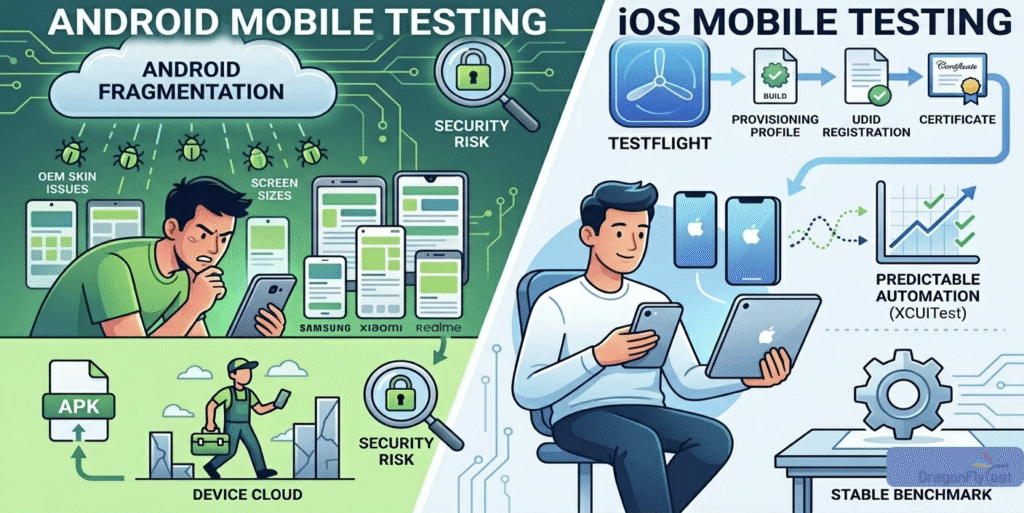
With Android, Google puts out the OS and then basically hands it to manufacturers who do… whatever they want with it. Samsung puts their One UI on top. Xiaomi has MIUI. Realme has their own skin. Each of these behaves slightly differently. Same app, same APK, different experience depending on whose phone you pick up. For Android mobile testing, this means you’re never truly done testing on one device.
iOS’s Closed Ecosystem
Apple doesn’t play that game. They make the phone, they make the OS, they control updates. Every iPhone 13 runs the same iOS 16. No surprises. And from a pure iOS mobile testing standpoint? That consistency is a huge gift. It’s one reason iOS mobile testing tends to feel smoother from day one.
3. Device Fragmentation: The Biggest Challenge in Android Mobile Testing
People have been complaining about Android fragmentation for over a decade and guess what — it’s still very much a thing. In fact, device fragmentation is arguably the single biggest reason Android mobile testing is harder than iOS mobile testing.
Real-World Android Fragmentation Example
I once had a bug that only showed up on Android 10 devices from one specific manufacturer. Not Android 9, not Android 11 — just that one version on that one brand. Took us three days to even figure out where the bug was coming from. That kind of thing just doesn’t happen in iOS mobile testing.
The screen size story is similar. You’ve got everything from tiny budget phones to massive tablets all running Android. Testing a UI across that range in Android mobile testing is genuinely exhausting. You fix the layout for one device and something breaks on another.
iOS isn’t perfect here either — different iPhone sizes, iPad variants — but the range is so much smaller. Because Apple pushes updates aggressively and users actually install them, you’re rarely supporting more than two or three iOS versions at a time. Android? I’ve seen production apps still needing to support Android 8 because a chunk of the user base never upgraded.
4. How Builds Are Shared with Testers: Android vs iOS
Okay, this one is where Android mobile testing genuinely wins, no argument.
Android Build Distribution
Need to get a build to your QA team for Android mobile testing? You zip up an APK, share it over Slack or email, and they install it. Done. Takes two minutes. No gatekeeping, no setup overhead.
iOS Build Distribution
iOS mobile testing? Oh boy. You need a provisioning profile. The tester’s device UDID needs to be registered. The certificate needs to be valid. Then you either push through TestFlight (which has its own approval lag) or go through Xcode directly. I’ve had whole afternoons eaten up just getting a build onto a test device because of certificate issues. TestFlight has improved things a lot, but the underlying iOS mobile testing setup process is still complex for new team members.
5. Automation Tools and Frameworks for Android and iOS Mobile Testing
Choosing the right automation tool is critical in both Android mobile testing and iOS mobile testing. Let’s break down what actually works.
Appium: Cross-Platform for Android and iOS Mobile Testing
Appium comes up in every conversation about mobile testing automation, and for good reason. Cross-platform support, decent community, works with multiple languages. But “works on both” doesn’t mean “works equally well on both” for Android mobile testing vs iOS mobile testing.
Espresso and XCUITest
My Android mobile testing automation suites have always required more babysitting. Tests fail for weird reasons — emulator performance, timing issues, OEM-specific behaviors sneaking in. iOS mobile testing with XCUITest is genuinely impressive. Fast execution, tight integration with the platform, very stable results. Once a test passes, it tends to keep passing. That predictability is underrated when you’re running hundreds of tests in CI.
Espresso for Android mobile testing is great when it works. The synchronization with the app is smart and fast. But it only tests one app, and the moment you have multi-app flows, you’re reaching for UI Automator or a combination of both.
6. Identifying UI Elements in Android Mobile Testing vs iOS Mobile Testing
You wouldn’t think element locators would be a big deal. They are — and the difference between Android mobile testing and iOS mobile testing here is significant.
In Android mobile testing, I’ve had resource IDs that were inconsistent across devices. Same app build, different ID on different phones. XPath is even worse — fragile, slow, and breaks constantly when the UI changes even slightly.
iOS mobile testing accessibility identifiers are far more reliable. If developers add them properly, your tests are rock solid. I’ve had iOS mobile testing automation suites run for months without needing locator fixes. Can’t say the same for Android. Regardless of platform — push your dev team to add accessibility IDs. It pays off every single time.
7. Performance Testing: Android Mobile Testing vs iOS Mobile Testing
Performance testing behaves very differently depending on whether you’re doing Android mobile testing or iOS mobile testing.
Android Performance Testing
When I’m performance testing an Android app, I have to think about a whole spectrum of hardware. There are people using your app on a 3-year-old budget phone with 2GB of RAM. That’s a real user. Android mobile testing for performance is almost more like a range study — you pick a few representative devices across low, mid, and high tiers and see how the app holds up.
iOS Performance Testing
iOS mobile testing for performance is more like a benchmark exercise. Apple’s hardware is consistent and well-defined. You test on a couple of iPhone models and the results translate pretty cleanly across the device family. It’s less stressful, honestly.
8. Security Testing: Why Android Mobile Testing Needs Extra Care
This is one area I feel strongly about. Android mobile testing for security cannot be an afterthought.
Android lets users install apps from outside the Play Store. That opens serious attack surfaces. Insecure data storage, weak permissions, unencrypted traffic — these things matter way more in Android mobile testing because the environment is just less controlled.
iOS mobile testing starts from a stronger security baseline. Apple’s review process and tight sandboxing catch a lot of things before they reach users. That doesn’t mean you skip security testing on iOS — you definitely don’t — but the threat model is genuinely different between Android mobile testing and iOS mobile testing. I’ve seen teams copy-paste their iOS security checklist for Android. That’s a mistake every time.
9. Test Execution Speed and CI Stability in Android and iOS Mobile Testing
From a CI pipeline perspective, iOS mobile testing usually wins on speed and stability. Setting up iOS mobile testing CI feels achievable — Xcode version mismatches are a personal nemesis, but it generally holds together.
Android mobile testing CI is a constant negotiation. Emulator startup times, random crashes, tests that pass locally and fail in the pipeline for no obvious reason. I have a theory that Android emulators are haunted. Unproven, but I stand by it. The teams I’ve seen handle Android mobile testing CI well all invested seriously in real device cloud testing — Firebase Test Lab, BrowserStack — instead of relying on emulators for everything.
10. Real Device Testing vs Emulators in Android and iOS Mobile Testing
Android emulators are pretty solid for functional Android mobile testing. They’ve gotten much faster with hardware acceleration and you can spin up different API levels easily. I use them constantly for quick sanity checks.
iOS mobile testing simulators are useful but have a ceiling. Camera? Doesn’t work. Push notifications? Weird behavior. Anything Bluetooth or NFC? Real device only. I’ve seen junior testers mark bugs as fixed after iOS mobile testing on a simulator and then the same bug shows up immediately on a real phone. Don’t make that mistake.
Rule of thumb I follow for both Android mobile testing and iOS mobile testing: simulators and emulators for speed during development, real devices for anything going into a release candidate.
11. Conclusion: Android Mobile Testing vs iOS Mobile Testing — Which is Harder?
Android. Not even close.
But harder doesn’t mean worse. Android mobile testing just means you need to plan more carefully — more devices in your test matrix, more investment in your automation infrastructure, more attention to security edge cases.
iOS mobile testing is more predictable, which means you can move faster once you’re set up. The initial overhead with provisioning and certificates is annoying, but once that’s sorted the actual iOS mobile testing work flows pretty smoothly.
If you’re building for both platforms — which most teams are these days — don’t try to run the exact same strategy for both Android mobile testing and iOS mobile testing. Adapt. Figure out what each platform actually needs and build your approach from there. That’s honestly the only way to do it well.
Anyway, that’s my take on Android mobile testing vs iOS mobile testing. Happy to hear if your experience has been different — this stuff varies a lot depending on the type of app you’re working on too.
12. Frequently Asked Questions About Android Mobile Testing vs iOS Mobile Testing
Is Android mobile testing harder than iOS mobile testing?
Yes, Android mobile testing is generally harder due to device fragmentation, OEM customizations, and less stable automation. iOS mobile testing benefits from a controlled hardware and software environment which makes test execution more predictable.
Which tools are used for Android mobile testing?
The most popular tools for Android mobile testing include Appium (cross-platform), Espresso (native UI testing), and UI Automator (system-level testing). For real device coverage, Firebase Test Lab and BrowserStack are widely used.
Which tools are used for iOS mobile testing?
For iOS mobile testing, XCUITest is the native framework of choice. Appium also supports iOS mobile testing for cross-platform automation. TestFlight is used for distributing builds to testers before App Store release.
Should I test on real devices or emulators for Android and iOS mobile testing?
For both Android mobile testing and iOS mobile testing, use emulators and simulators for speed during development, but always validate on real devices before release. iOS simulators especially have hardware limitations that make real device testing essential for camera, Bluetooth, and notification features.

 USA
USA