
Web browsers can be automated with Selenium, an open-source automation tool. It is mainly used for:
1. Testing of web applications.
2. Testing for regression.
3. Testing across browser.
4. Functional testing.
5. UI automation.
Multiple programming languages, including Java, Python, C#, JavaScript, Ruby, and others, are supported.
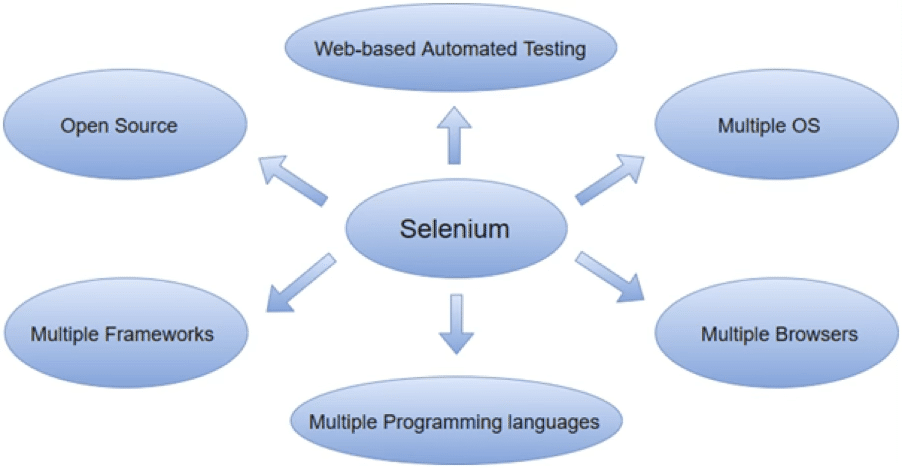
Advantages of Selenium
1. Open Source (Free Tool) You can use Selenium for free. No license fee. backed by a sizable community.
2. Supports Multiple Programming Languages Test scripts can be written in Java, Python, C#, JavaScript, and Ruby. Selenium WebDriver makes this possible.
3. Testing Across Browsers Chrome, Firefox, Edge, and Safari can all be automated. Browser vendors such as these maintain drivers: ChromeDriver from Google Mozilla (GeckoDriver)
4. Cross-Platform Support focuses on: Windows macOS Linux.
5. Support for Parallel Execution Selenium Grid allows you to: Conduct testing across several machines. Run tests concurrently. Reduce the duration of execution.
6. Integrating Other Tools Easy integration of Selenium with: JUnit TestNG Cucumber, Maven Jenkins, and all CI/CD tools.
7. Compatible with Current Browsers (Selenium) (4) The W3C WebDriver standard DevTools for Chrome Support for protocols Locators that are relative.
Disadvantages of Selenium
1. Only Allows Web Applications Desktop programs cannot be automated Not able to directly automate mobile apps Use Appium for mobile automation. Use WinAppDriver for desktop automation.
2. No Integrated Reporting There are no built-in reports in Selenium. You require third-party resources such as: Reports from TestNG Reports on Extent.
3. Managing OTP and Captcha Selenium is unable to automate: Verification of Captcha OTP Scanning barcodes These functionalities are blocked by security.
4. Excel files (Apche Poi) are not supported by Selenium.
Selenium Versions (Evolution)
- Selenium 1 (RC – Remote Control) – 2004 Created by Jason Huggins JavaScript injection was used to manipulate browsers. Selenium Server Requirement Less steady and slower.

- Selenium 2 (WebDriver) – 2011 ❌ Now deprecated WebDriver API was introduced. Straightforward interaction with browser drivers Quicker than Selenium RC More steady This is where Selenium WebDriver gained popularity.
- Selenium 3 (2016) Selenium RC was fully eliminated and replaced with WebDriver Browser makers maintain browser drivers. GeckoDriver → by Mozilla ChromeDriver → by Google.
Selenium Architecture (Very Important)
Selenium 3 Architecture
Test Script (Java/Python)
↓
Selenium Client Libraries
↓
JSON Wire Protocol
↓
Browser Driver (ChromeDriver/GeckoDriver)
↓
Real Browser
Explanation:
1️. You write test script in Java/Python
2️. Selenium Client Library converts commands
3️. JSON Wire Protocol sends commands
4️. Browser Driver receives commands
5️. Browser executes actions
- Selenium 4-2021 (the most recent major version) Significant enhancements include: W3C WebDriver standard support; enhanced Selenium Grid; relative locators (above, below, and near); improved window/tab management; support for the Chrome DevTools Protocol (CDP); and improved architecture.

Selenium 4 Architecture (Improved)
Test Script
↓
Selenium Client Library
↓
W3C WebDriver Protocol
↓
Browser Driver
↓
Browser
What Changed?
- ❌ Removed JSON Wire Protocol
- ✅ Direct W3C standard communication
- Faster and stable
- No intermediate encoding/decoding issues
Selenium Components
Selenium is more than one tool. It consists of four primary parts:
1. The Selenium IDE Tool for recording and replaying accessible as an extension for Firefox and Chrome Excellent for novices.
2. Selenium WebDriver (The Most Crucial) Essential element programmatically automates browsers API based on languages
For example, WebDriver driver=new ChromeDriver(); driver.get (“https://google.com”);
3. Selenium Grid is used for testing in parallel. Testing across browsers
4. Selenium RC (Deprecated) Outdated part No longer in use

How Selenium Works (Step-by-Step Flow)
For instance,
driver.findElement(By.id (“username”)).sendKeys (“admin”);
Flow:
1.Java-written test command.
2. WebDriver command conversion from the client library.
3.Delivered to the Browser.
4.Driver Driver switches to browser-native automation.
5.The browser takes action.
Conclusion – Selenium
In conclusion, one of the most effective and popular open-source automation tools for web application testing is Selenium. It is crucial to contemporary software testing because it makes:
- Automation of web applications
- Testing across browsers
- Testing across platforms
- Functional testing and regression
- UI automation
The tool has changed dramatically from Selenium 1 (RC) to Selenium 4. Automation became more reliable, standardized, and effective with the implementation of the W3C WebDriver protocol, particularly in Selenium 4.
Why Selenium is Important
The Significance of Open-Source and Free Selenium Many programming languages (Java, Python, C#, etc.) are supported. Compatible with the main browsers: Chrome, Firefox, Edge, and Safari Simple integration with Jenkins and other CI/CD tools enables Selenium Grid-based parallel execution.
Limitations
- Supports web applications only.
- Absence of integrated reporting
- Unable to directly handle OTP or CAPTCHA need third-party libraries (such as Apache POI) to handle Excel.

 USA
USA